Skip to content

Pharmacy management software · Web & Android

Run Your Pharmacy Smarter. Manage Everything in One Place.

Manage pharmacy operations, inventory, sales, prescriptions, multiple outlets, staff, and business performance from one intelligent platform.

  • Works in any browser
  • Android app included
  • Built for multi-outlet pharmacies
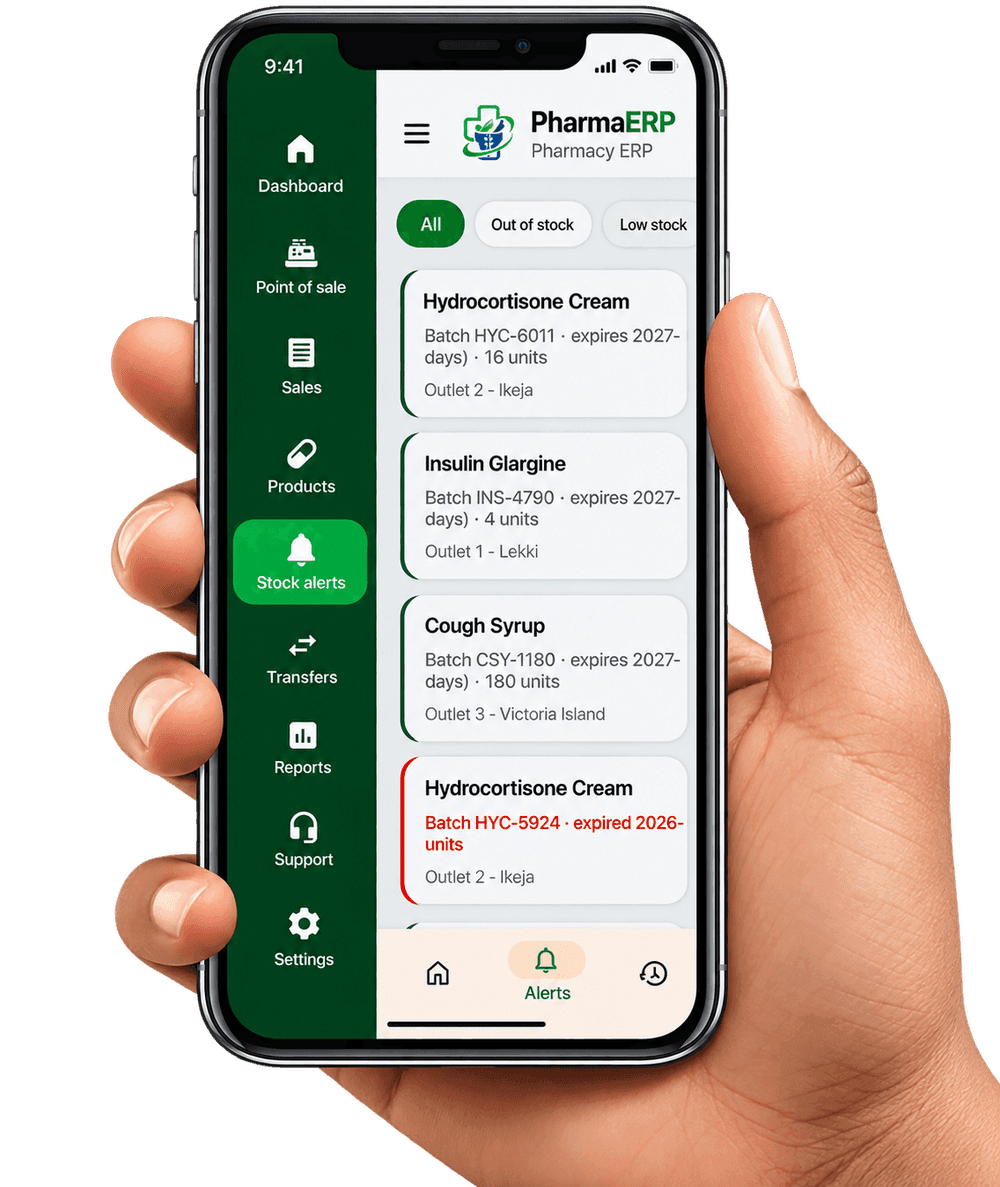
PharmaERP Android app showing stock alerts by batch, expiry date and outlet, with an expired batch flagged in red

Every part of your pharmacy, in one platform

  • Sales POS
  • Inventory
  • Products
  • Suppliers
  • Stock Receiving
  • Supply Requests
  • Stock Transfers
  • Stock Alerts
  • Expiry Management
  • Sales & Revenue
  • Profit & Loss
  • NAFDAC Records
  • Outlets / Branches
  • Staff Permissions
  • Audit Logs
Why PharmaERP

Pharmacy operations, simplified from counter to back office

Paper stock cards, separate spreadsheets and guesswork about expiry dates cost pharmacies money every day. PharmaERP replaces them with one system your whole team works from.

  • Every stock movement on a ledger

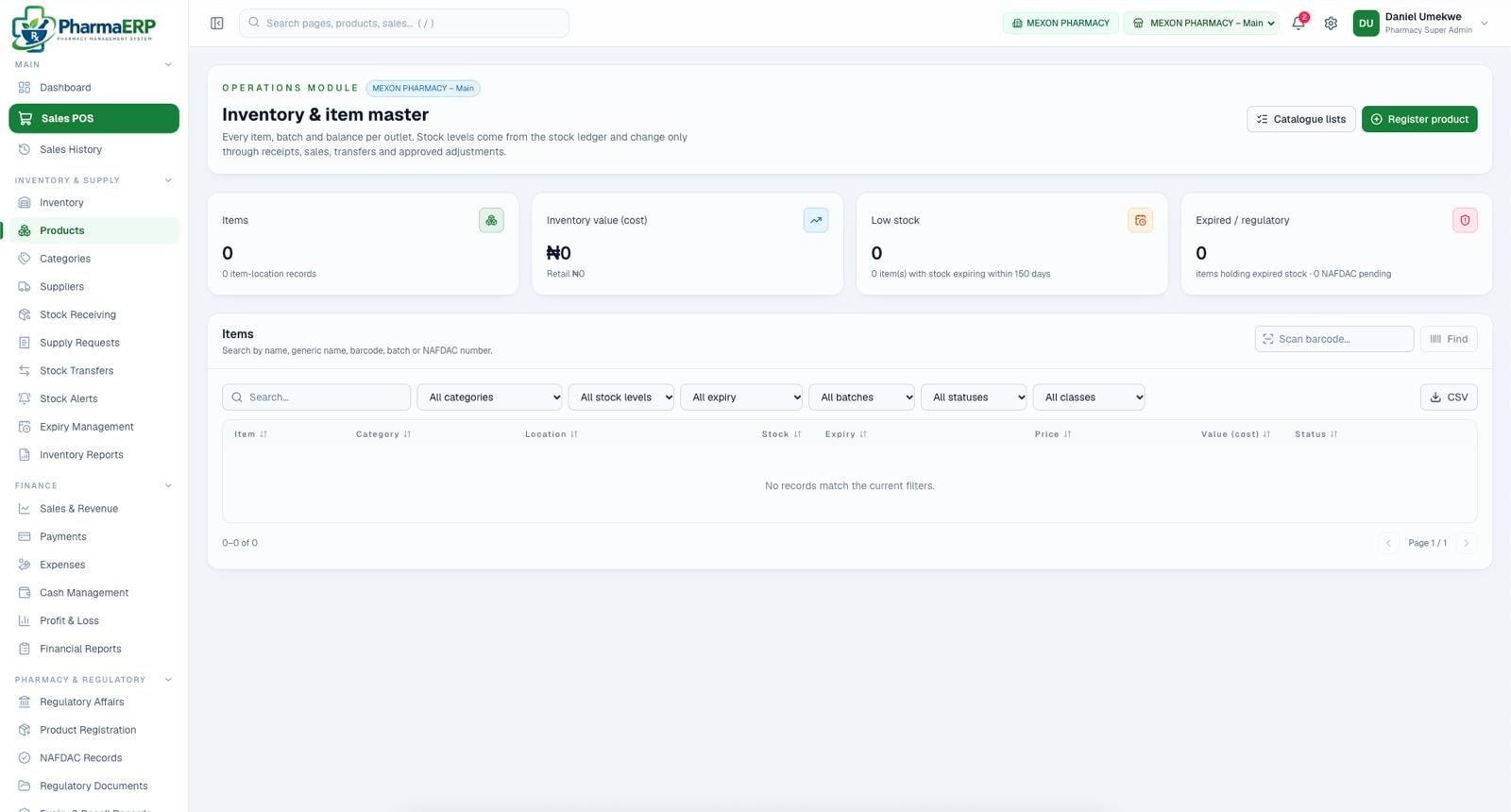
    Stock levels change only through receipts, sales, transfers and approved adjustments, so balances always add up.

  • Built around batches and expiry

    Search by name, generic name, barcode, batch or NAFDAC number, and see stock expiring within your warning window at a glance.

  • Each outlet separate, all connected

    Every item, batch and balance is kept per outlet, while owners see the whole business from one account.

PharmaERP inventory and item master screen with item count, inventory value, low stock and expired stock cards, and filters by category, stock level, expiry and batch
Features

Everything a modern pharmacy needs to run well

From the sales counter to the store room and the owner's report, PharmaERP covers the work your team does every day.

  • Pharmacy dashboard

    A live view of sales, stock and alerts for the outlet you are working in, plus a daily report across all outlets.

  • Point of Sale (POS)

    Search or scan a barcode, take cash, card or transfer, and record the prescription reference for prescription-only items.

  • Inventory management

    One item master per outlet, stock valued at cost and retail, and packaging levels that convert to the base unit automatically.

  • Batch & expiry tracking

    Every batch carries its expiry date. Near-expiry stock is grouped into warning windows you choose, from 150 days down to 30.

  • Stock alerts

    Out-of-stock, low-stock and expired-batch alerts, plus a daily inventory summary in your notifications.

  • Multi-outlet management

    Run branches, warehouses and stores from one account, with stock and sales kept separately for each location.

  • Inter-outlet stock transfers

    Move stock between outlets with a full record of what left one branch and arrived at another.

    On plans that include transfers

  • Sales management

    Sales history with discounts, returns and voids, filtered by date, cashier, payment method and status. Export to CSV.

  • Reports & analytics

    Sales and revenue, profit and loss, inventory and financial reports, so the numbers behind each decision are clear.

  • Staff & user management

    Individual staff accounts, role-based permissions per outlet and audit logs of who did what.

  • Supplier management

    Keep supplier records, set a preferred supplier per product, raise supply requests and receive stock against them.

  • Pharmacy settings

    Your pharmacy's name and logo, VAT rate, near-expiry windows and payment approval limits, all in one place.

Inside PharmaERP

Built for the way pharmacies work

Real screens from PharmaERP on the web and on Android.

Operations

Monitor your pharmacy operations

Start each day knowing where you stand. PharmaERP sends a daily inventory summary and keeps alerts one click away in the top bar.

  • Low-stock and out-of-stock counts
  • Outlets with critical shortages
  • Expired batches valued at cost
  • Products approaching expiry
PharmaERP notifications panel showing a daily inventory summary with low-stock products, outlets with critical shortages, expired batches and products approaching expiry

Point of Sale

Manage sales with a fast, focused POS

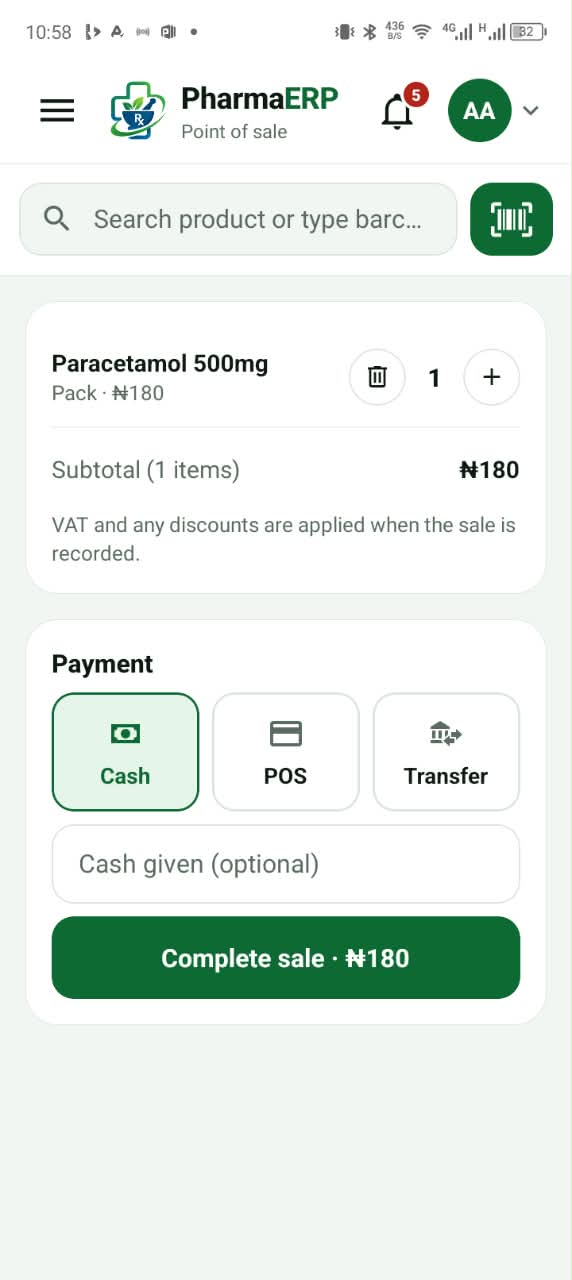
Search by name or scan a barcode, adjust quantities and complete the sale in seconds, at the counter or on an Android phone.

  • Barcode scanning with the phone camera
  • Cash, POS terminal and bank transfer
  • Prescription reference for POM items
  • VAT and discounts applied on recording
PharmaERP Android point of sale with Paracetamol 500mg in the basket and cash, POS and transfer payment options

Inventory

Track inventory and medication expiry

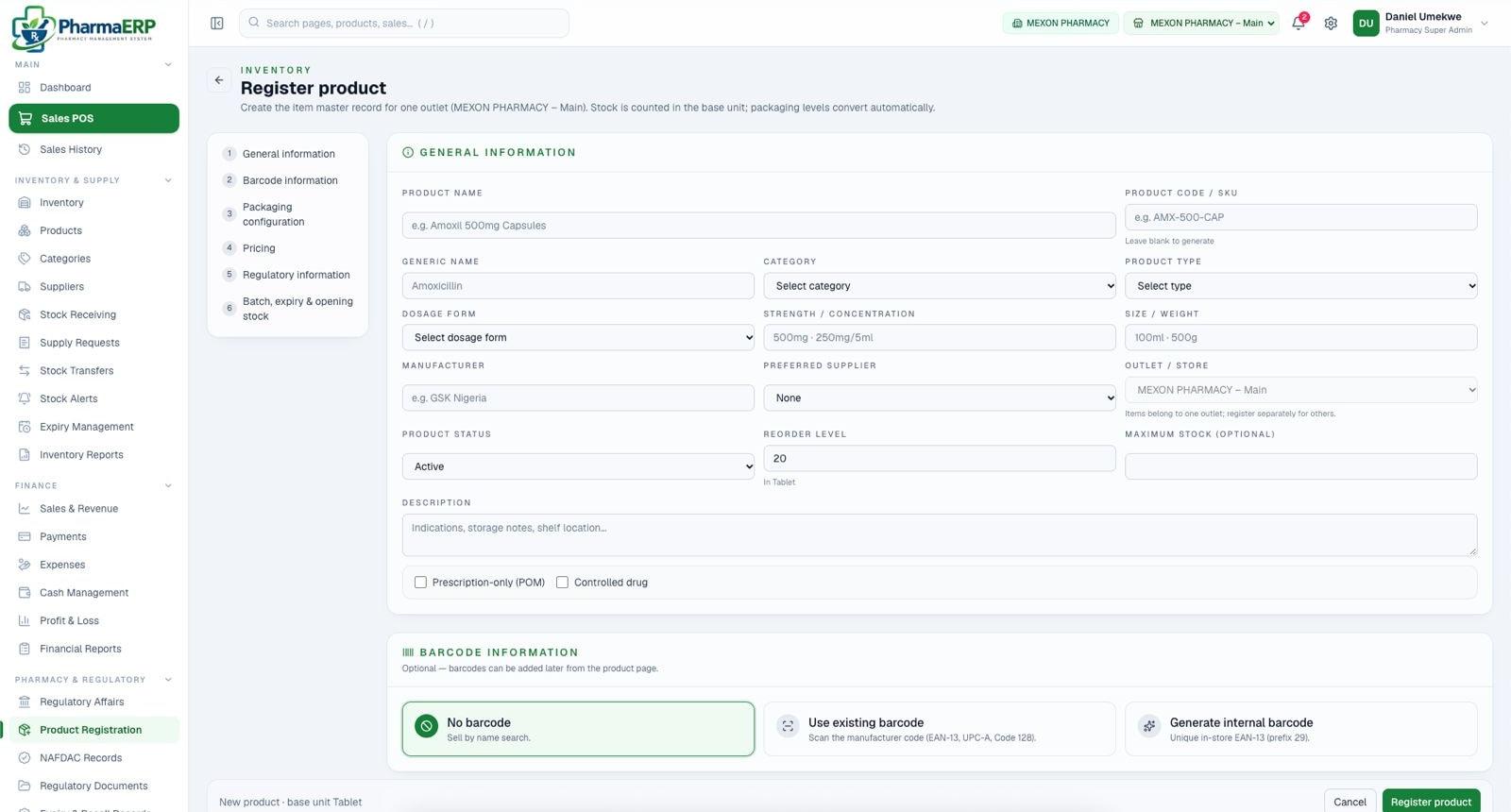
Register each product once with its generic name, dosage form, strength, packaging and reorder level, then record batch, expiry and opening stock.

  • Packaging levels convert to the base unit
  • Prescription-only and controlled drug flags
  • Existing, internal or no barcode
  • Reorder level drives low-stock alerts
PharmaERP register product form with general information, barcode options, packaging, pricing, regulatory information and batch, expiry and opening stock steps

Multi-outlet

Manage multiple pharmacy outlets

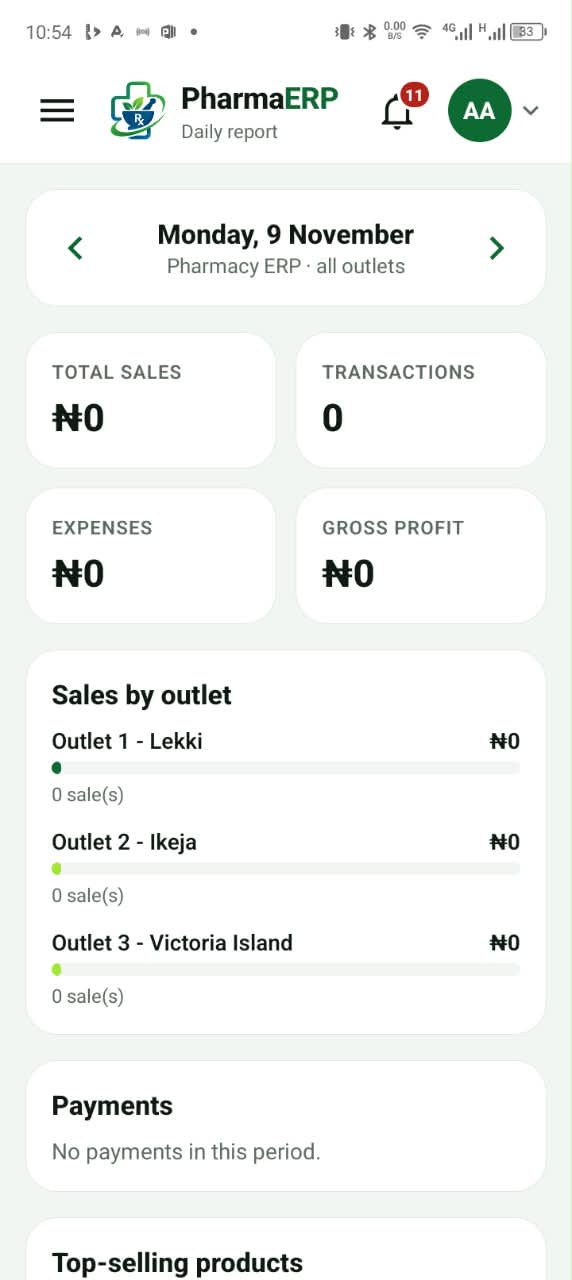
See total sales, transactions, expenses and gross profit for the whole business, with sales broken down by outlet, from your phone.

  • Daily report across all outlets
  • Sales by outlet side by side
  • Payments and top-selling products
  • Switch outlet without signing out
PharmaERP daily report on Android showing total sales, transactions, expenses, gross profit and sales broken down by outlet

Reports

Monitor business performance with reports

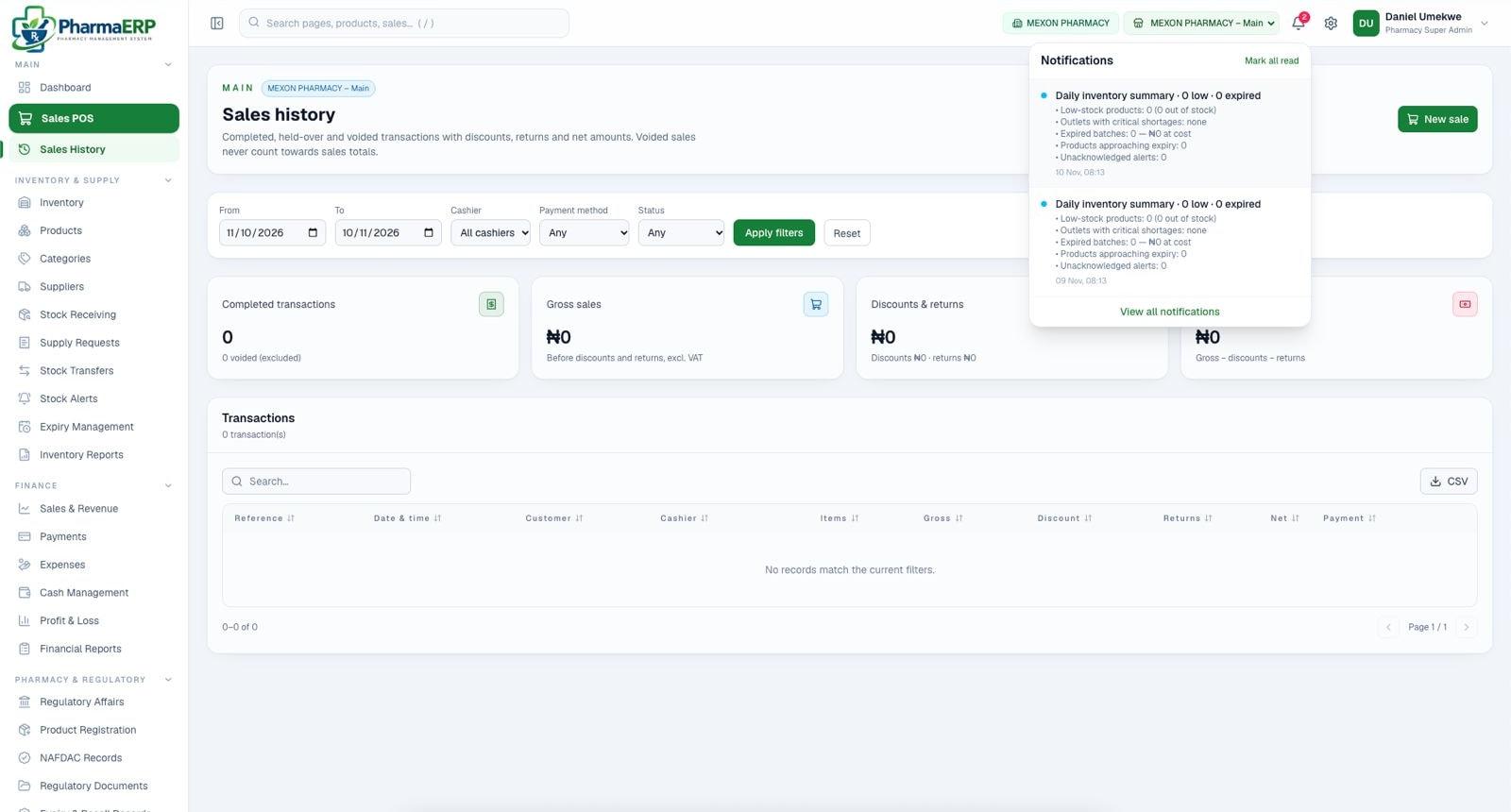
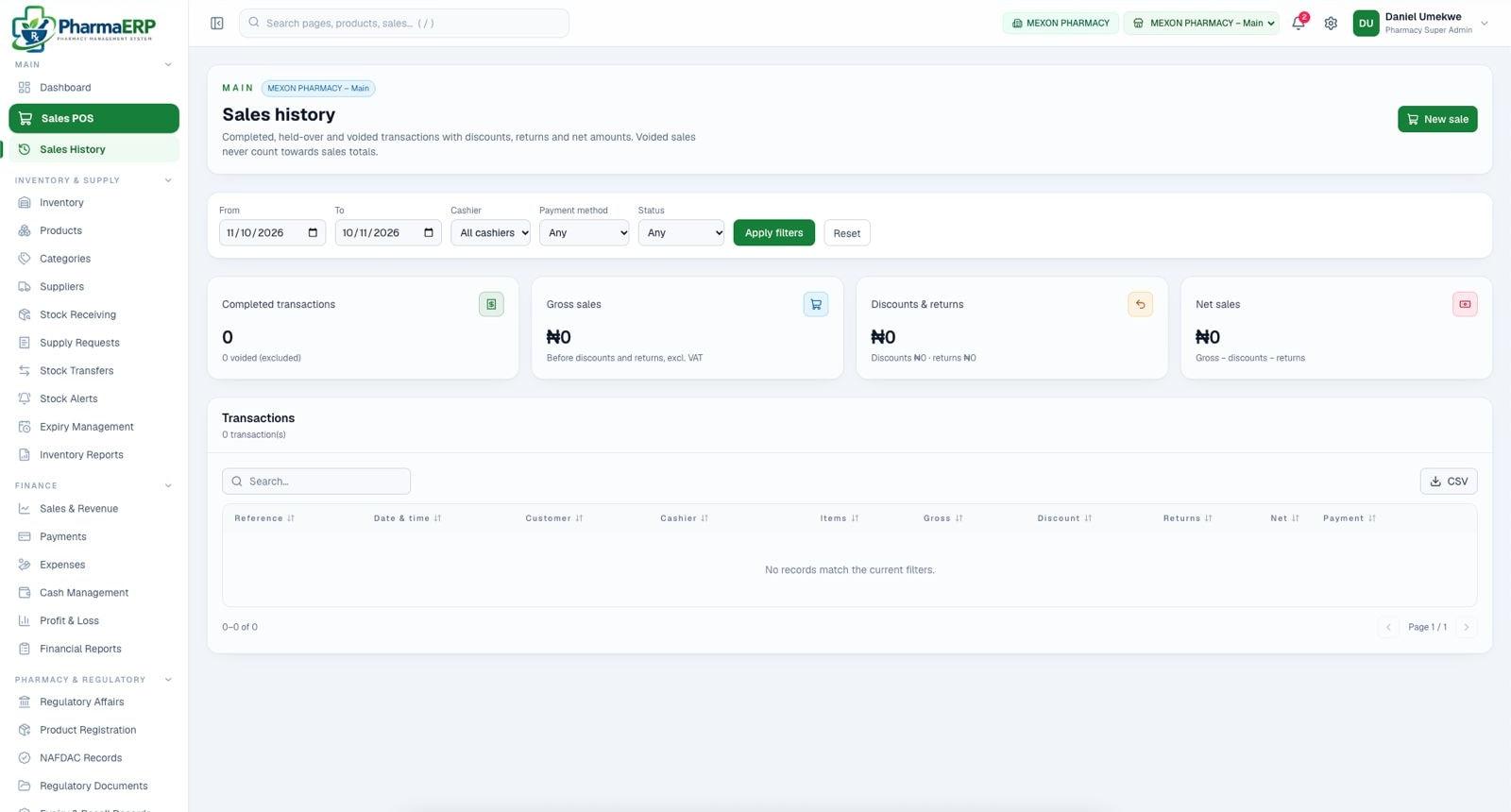
Review completed, held-over and voided transactions with discounts, returns and net amounts. Voided sales never count towards totals.

  • Filter by date, cashier, payment and status
  • Gross sales, discounts, returns and net
  • Export transactions to CSV
  • Profit & loss and financial reports
PharmaERP sales history with date, cashier, payment method and status filters and completed transactions, gross sales, discounts and returns, and net sales totals
Pharmacy settings

Configured around how your pharmacy runs

Owners and super admins control the rules once, and every outlet follows them.

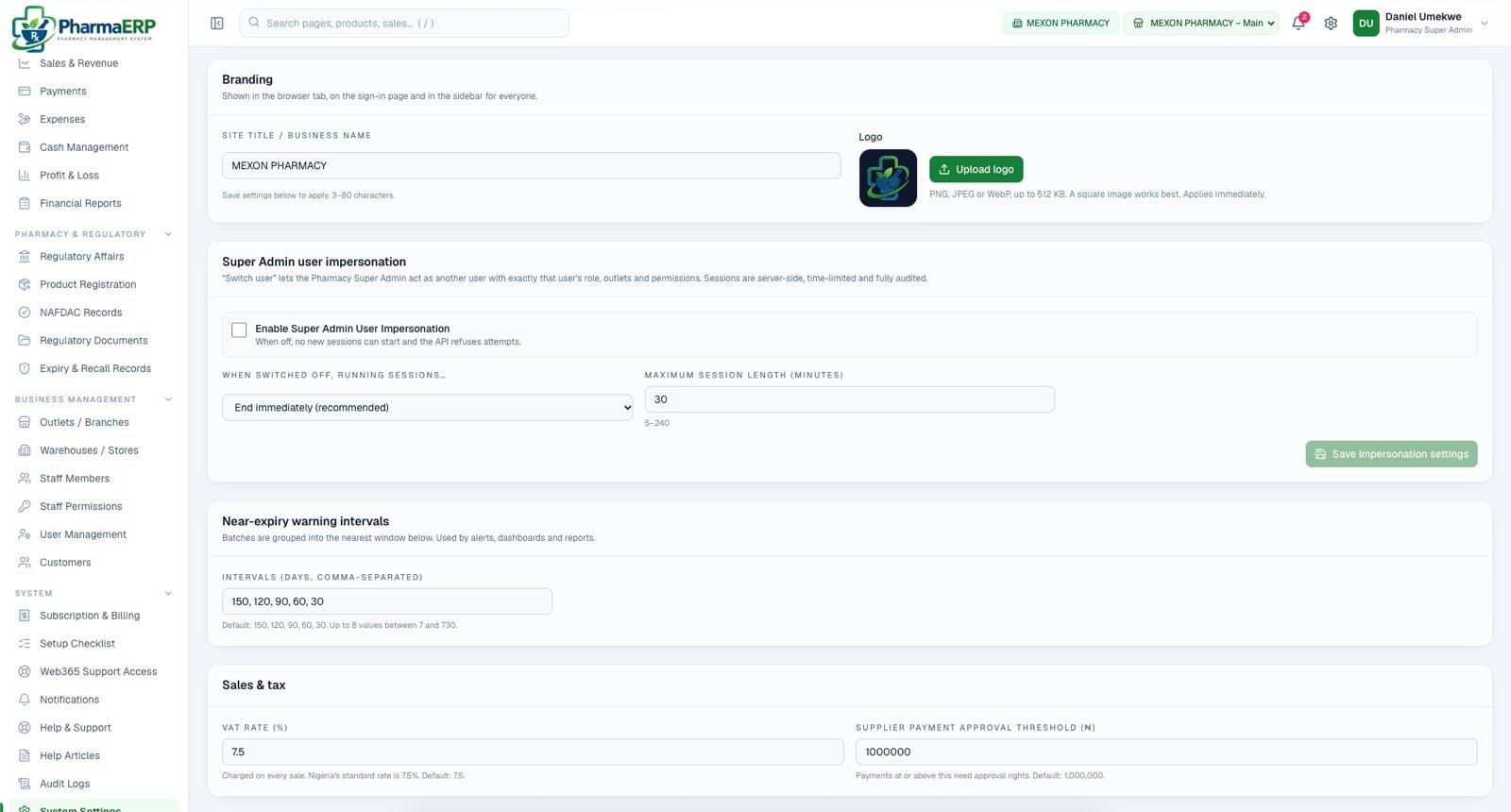
PharmaERP system settings with branding, super admin user impersonation controls, near-expiry warning intervals and sales and tax settings
  1. 1

    Your brand on every screen

    Your pharmacy's name and logo appear in the browser tab, on the sign-in page and in the sidebar for everyone.

  2. 2

    Expiry windows that suit your stock

    Choose up to eight near-expiry warning intervals. Alerts, dashboards and reports all use them.

  3. 3

    VAT and approval limits

    Set the VAT rate charged on sales and the supplier payment amount that needs approval rights.

Benefits

Less waste, fewer surprises, better decisions

What changes when your pharmacy runs on one system.

  • Reduce inventory losses

    Stock only changes through receipts, sales, transfers and approved adjustments, so every unit is accounted for.

  • Catch expiring stock early

    Near-expiry warnings and expired-batch alerts surface problems while there is still time to act.

  • Faster, cleaner sales

    Barcode checkout, split payment methods and printable receipts keep the counter moving.

  • See every outlet centrally

    Compare sales by outlet and switch between branches without signing out.

  • Make better decisions

    Profit and loss, sales and inventory reports turn daily activity into clear numbers.

  • Simpler daily operations

    A setup checklist, in-app help and support tickets keep your team on track from day one.

How it works

Up and running in four steps

No installation and no hardware to buy. Your team can start from any browser.

  1. 1

    Create your pharmacy account

    Register your pharmacy and choose the plan that fits your business.

  2. 2

    Set up outlets and settings

    Add your branches, upload your logo and set VAT and expiry warning windows. A setup checklist guides you.

  3. 3

    Add products, stock and staff

    Register products with batches, expiry dates and opening stock, add suppliers, then invite your team with the right permissions.

  4. 4

    Start selling and monitoring

    Sell from the POS, watch stock alerts and follow performance in your reports, on the web or the Android app.

Pricing

Plans that grow with your pharmacy

Simple, transparent pricing. Choose the plan that fits your pharmacy today and change it as you add outlets and staff.

Loading plans…

Every plan includes the Android app, stock alerts and supplier records. Subscriptions and billing are managed from inside the app.

Mobile app

Your pharmacy in your pocket

Sell, check stock alerts, follow the daily report and raise support tickets from the PharmaERP Android app. It uses the same account as the web app.

Download for Android iOS coming soon

Free with every plan · Android 7 or later

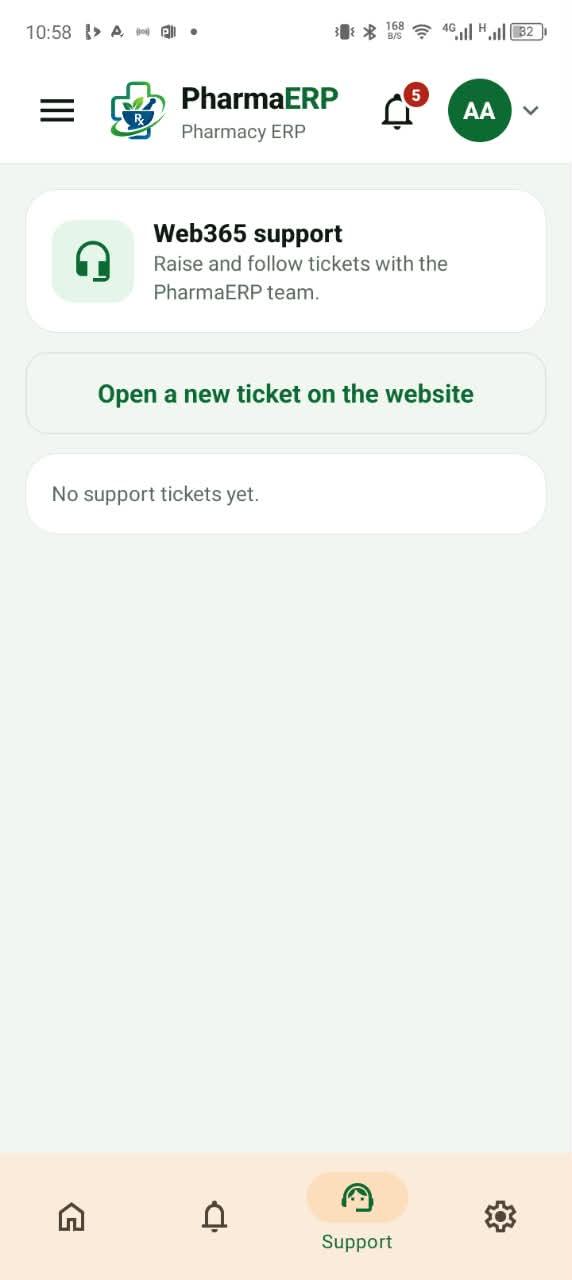
PharmaERP Android app support screen for raising and following tickets with the Web365 support team
FAQ

Frequently asked questions

Answers about getting started, outlets, expiry tracking, security and support.

PharmaERP is a cloud pharmacy management system. It brings your point of sale, inventory, batch and expiry tracking, suppliers, staff, outlets and reports into one platform, built for how pharmacies actually work.

No. PharmaERP runs in any modern web browser, so there is nothing to install on your counter computer. An Android app is also available for working on the go.

Create your pharmacy account and choose a plan. A setup checklist then walks you through adding outlets, your business details, products with their batches and opening stock, suppliers and staff.

Yes. Each outlet keeps its own inventory and sales, and you can switch between outlets from the top bar. Reports can be viewed per outlet or across all outlets. Stock transfers between outlets are available on plans that include them.

Every batch is recorded with its expiry date. Batches are grouped into near-expiry warning windows (150, 120, 90, 60 and 30 days by default, and you can change them), expired batches are flagged, and a daily inventory summary lists low stock and expiries.

Each pharmacy's data is kept separate from every other pharmacy. Every staff member signs in with their own account, permissions are set by role and outlet, and audit logs record activity. The Web365 support team can only access your pharmacy when you approve it.

You choose a plan when you register and can manage your subscription and billing from inside the app. Current plans and prices are shown in the pricing section above.

You can raise and follow support tickets from inside the app, browse help articles, or email the PharmaERP team. Write to support@pharmerp.name.ng.

Ready to run your pharmacy smarter?

Bring sales, stock, expiry, outlets and staff together in PharmaERP. Set up your pharmacy today.